

SEO plugins for WordPress websites are great because, even if we know all the tricks for optimizing our content, actually putting that knowledge into practice can sometimes be easier said than done.
It can help to have an accountability partner, and that’s basically the purpose of getting an SEO plugin for WordPress. It’s like having someone looking over your shoulder pointing out the things you missed and telling you everything you did wrong so you can fix it before hitting that “publish” button.
That said, I’ve only had personal experience with two SEO plugins for WordPress websites, so I’m just going to be talking about those plugins in this post.
Table of Contents
Yoast SEO Plugin for WordPress Websites
Yoast is probably the most popular SEO plugin for WordPress websites, but personally, I would not say it’s the best. My main complaint with Yoast is that it promotes keyword stuffing.
Keywords
While checking to make sure you’re using your target keyword throughout your content is absolutely necessary if you’re trying to rank on the first page of Google for that keyword, stuffing that word or phrase into your content an unnatural number of times can actually hurt your search rankings. So, while I do have Yoast for one of my websites, I don’t pay much attention to it and I never look at the SEO analysis it provides.
That said, I installed Yoast before I knew anything about SEO and I’ve just left it there out of inertia. It’s a website I run for fun, so I don’t care about its domain authority.
I should also point out that one of the benefits of Yoast checking your keywords for you is that it can alert you if you’re targeting a keyword you’ve targeted on another piece of content before. That kind of mistake can lead to keyword cannibalization, but it’s also a really easy mistake to make, especially if you’ve created a lot of content for your website over the years.
Cornerstone Content

One thing I do like about Yoast is the fact that it lets you mark a piece of content as cornerstone content. I’ve written before about the importance of implementing topic clusters into your content marketing strategy. Topic clusters need one piece of content that all the clustered content leads back to so you can really boost the domain authority and search rankings of that particular piece of content. Some people call it cornerstone content, others call it pillar content, but the idea is the same.
By using Yoast to tag a piece of content as cornerstone content, you can remind yourself that you have certain goals for that piece of content and that you need to create more content to lead back to it so you can achieve those goals.
Backlinks
Any optimized piece of content needs to have both internal backlinks (links that lead to other pieces of content on your website) and outbound links (leading to other websites). Yoast can help you keep this in mind by keeping both inbound and outbound links as items on its SEO checklist that should be checked off before you hit “publish”.
Images
Proper use of branded images can be a great way to make your content more digestible for readers, but since Google cannot read images (yet), content marketers need to be sure to include alt tags for each of their images, preferably with relevant keywords.
Not only does Yoast make sure you have images in your content, it also checks to see if you’ve attributed alt tags to those images, and if so, if they’re in your list of keywords for that piece of content.
Length
I’ve talked a lot on this blog about the importance of writing long content in order to both get Google’s attention and to keep readers engaged once they find your content. Yoast technically checks for this, but it’s happy as long as your content is longer than 300 words, but I’d say the minimum is closer to 500-600 words, and it keeps getting longer. These days, the average length of a piece of content that ranks on the first page of Google is almost 1,800 words. So, while it’s good to have text length on the checklist, I wouldn’t rely on Yoast’s idea of a sufficient length for any piece of content.
Meta Description Analysis

Your meta description is what shows up on the first page of Google underneath your headline. Not only does it need to be enticing enough to convince prospects to click through to your website, but it also needs to contain relevant keywords because, your meta description is going to be one of the first things Google “reads” in your content to get an idea of what it’s about and with which search terms it should be paired.
Yoast checks to make sure you’ve included a meta description and that it’s a good length (too short and it won’t do any good, too long and you’ll run out of room, which won’t do you much good, either). However, Yoast does not check to make sure your meta description includes your target keyword, which is a definite Fail.
Readability
Yoast also checks for “readability” of your content, and it does not do a great job. Its standards include things like avoiding passive phrases, but guess what? People use passive phrases. It does not inhibit the “readability” of your content. On the contrary, it can make your content sound more conversational, and since people are more likely to read content that sounds like the author is having a conversation with them, passive voice can actually improve the readability of your content. Just be sure not to overuse it.
SEO Preview
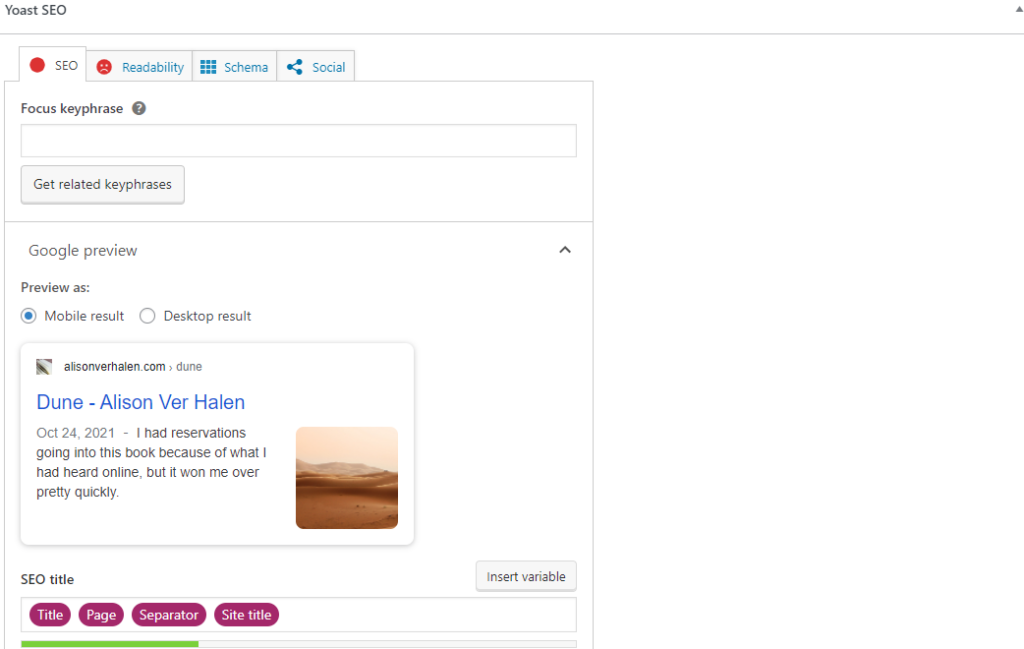
Yoast gives you a preview of what your content will look like when it comes up on a Google search, and it lets you view this preview in either Desktop mode or Mobile mode, which is great, because Desktop vs Mobile does make a difference, and with our world getting increasingly mobile, you need to make sure your content looks good on mobile devices.
All In One SEO Plugin for WordPress Websites
This is the SEO plugin I have for the WordPress website I do want to rank for relevant searches, so I tend to pay a lot more attention to what this tool is telling me. I also trust it more than I trust Yoast, so let’s dig in.
Snippet Preview
As with Yoast, AIOSEO lets you preview what your content will look like when it shows up on a Google search, and it lets you see both mobile and desktop versions.
Post Title
I’ll be honest, I don’t pay much attention to this particular feature because I use CoSchedule’s Headline Studio to perfect my headlines. I will say that I’m not thrilled with the fact that CoSchedule recommends headlines be 70 characters or longer because headlines actually tend to get cut off after about 70 characters, so I’m not sure why they think the super long titles are a good idea.
By contrast, AIOSEO recommends titles be no more than 60 characters long, which seems to be much more in line with the data we have on the ideal length of headlines.
Meta Description
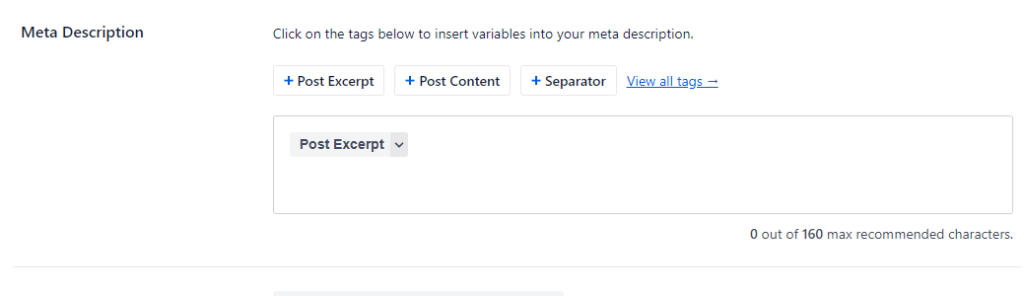
You can choose different pieces of content to be included in your meta description. The default is Post Excerpt, since WordPress gives you a section to provide a post excerpt anyway, so you might as well use it and have your SEO plugin for your WordPress website take your meta description from there. Just make sure to never use “Post Content” because that will just take content from somewhere in the body of your content and you never know which section the algorithm will choose, or if it’s content you really want prospects to see before they make the decision to click through to your website or keep scrolling.
Focus Keyphrase
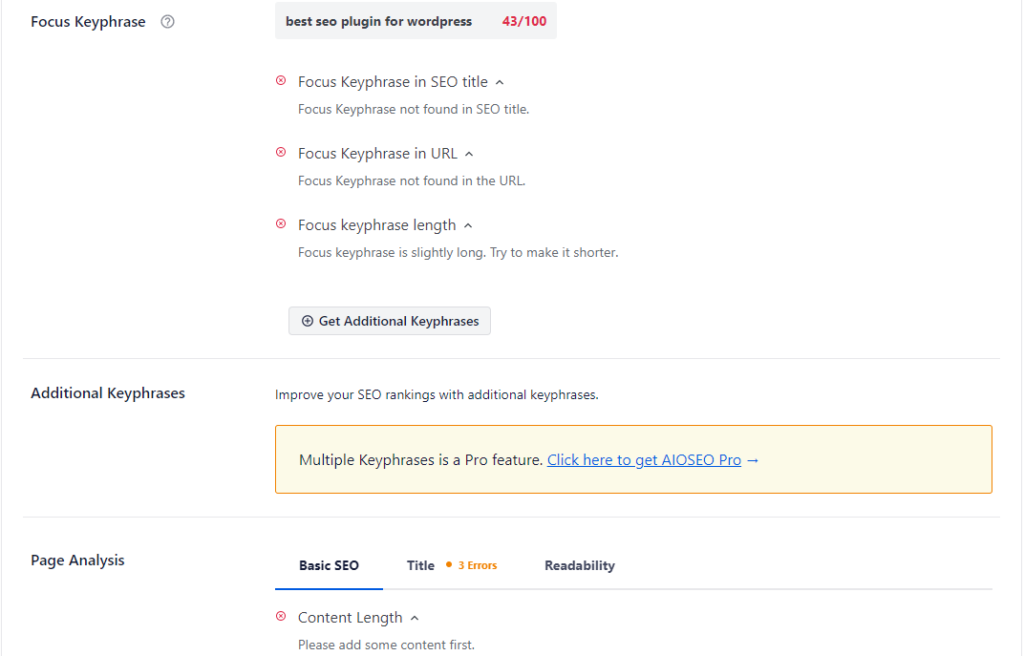
I love this feature because, before I started using AIOSEO, I would do my keyword research and come up with a title that included the keyword, but then I might get interrupted and have to go do something else before I could finish writing the blog post, much less optimizing it. I always had to make a note to myself what the target keyword was, but now I can just tell AIOSEO what my target keyword is and it will hold onto that information for me and also make sure the keyword is in all the right places, including my title, my URL, and my introduction.
AIOSEO will also tell me if the focus keyphrase is a good length, but I tend to ignore that advice because by the time I start working in WordPress, I’ve already done my keyword research and I know if the target keyphrase has the numbers I want.
Page Analysis
Page analysis checks for things like distribution and location of the focus keyphrase, length of the content, internal links, and external links.
It also includes things like a readability analysis, which, in addition to checking for things like passive voice and whether you’ve included images and/or video, also checks to make sure your sentences and paragraphs are short enough (the shorter the better. Lots of white space means it’s skimmable and easy to read quickly). It also checks to make sure you have a good distribution of subheadings.
As with Yoast, AIOSEO tends to give your content the seal of approval even when it’s way shorter than it really needs to be if you’re serious about trying to rank on the first page of Google for your target keyword.
AIOSEO gives you an overall SEO score between 1 and 100, with 1 being terrible and 100 being ideal. I like to shoot for 80 or higher, but if I land somewhere in the 70s, I’m not going to lose sleep over it.
Social Preview
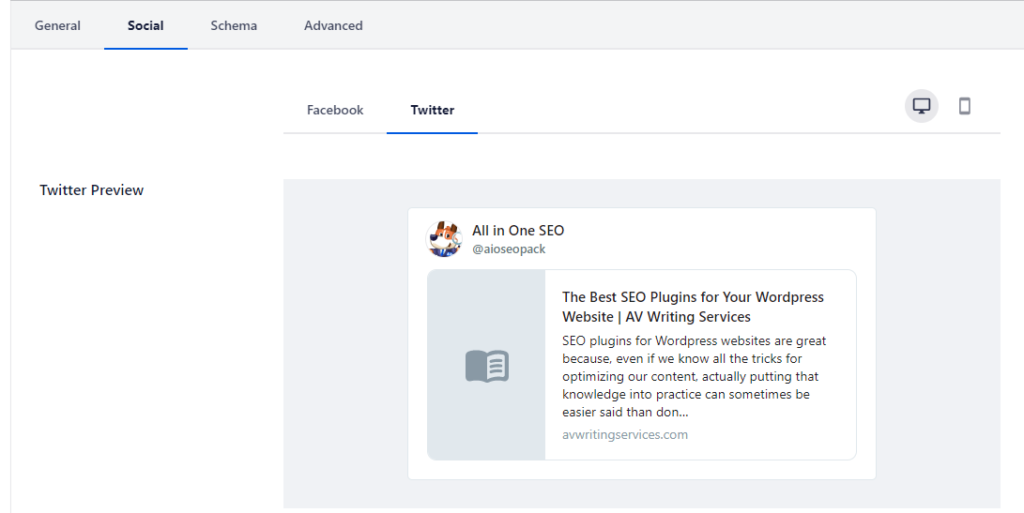
If social media marketing is your main strategy for distributing your content, you might want to check out the social tab AIOSEO offers, including previews of how your post will appear on Facebook and on Twitter, both on Desktop and on Mobile.
If you spend more time on Instagram or LinkedIn than Facebook or Twitter, you might not find this part of the tool especially useful, but since I do a lot of content promotion on both Facebook and Twitter, I do tend to check out this section before publishing anything.
Conclusion
Both Yoast and All in One SEO have a free version and a paid version. I’ve only ever used the free version for either one of them. I’m not sure about Yoast, but I know AIOSEO lets you do things like add more focus keyphrases with the paid version, as well as showing you more advanced analyses of your content. If you really need someone to hold you accountable and remind you of every, single thing you should be doing to optimize your content, you might find it worthwhile to go for the paid version.
Either way, the fact that both Yoast and AIOSEO have free versions means you can install one and play around with it, then install the other and play around with that one. Both plugins have their strengths and their weaknesses, but at the end of the day, you should feel comfortable using whatever SEO tools you use. If you don’t feel comfortable with it, you won’t use it, and that’s a waste of a tool that could be helping you achieve your content marketing goals.
If you liked this content and want to see more of it, you can sign up for our newsletter in the space below to make sure you never miss an update. You can also see what we’re up to by following us on LinkedIn, Twitter, YouTube, and Facebook.
Not sure your website is fully optimized? You can schedule an SEO consultation and we’ll give you some pointers on how you can improve your website’s optimization, as well as its ability to engage and convert visitors to the site.
